Saved Prompts
The Problem
Every new Claude session starts fresh. That workflow you perfected yesterday? Gone. The gotchas you learned the hard way? Forgotten. You end up repeating the same context, correcting the same mistakes, re-explaining your conventions.
The Solution
Saved prompts — persistent instructions that survive between sessions. They turn Claude from a generic assistant into a domain expert that remembers your workflows, your tools, your preferences.
How to Save and Use Prompts
Here’s a simple example prompt:
# Git Commit Guidelines

When I ask you to commit:
- Use conventional commit format: `type(scope): description`
- Types: feat, fix, docs, refactor, test, chore
- Keep the first line under 72 characters
- Add a blank line before the body if needed
- Reference issue numbers when relevant: `fixes #123`
Option 1: CLAUDE.md files
Claude Code automatically reads CLAUDE.md files. Save your prompt there:
| Location | Scope |
|---|---|
~/.claude/CLAUDE.md | All projects (global) |
./CLAUDE.md (project root) | This project only |
Both files are read together — just open Claude Code and it follows the instructions automatically.
Option 2: Custom slash commands
Create a .claude/commands/ folder in your project or home directory:
~/.claude/commands/
├── commit.md      # Invoke with /commit
├── review.md      # Invoke with /review
└── deploy.md      # Invoke with /deploy
Each file becomes a slash command. Type /commit and Claude loads that prompt.
Option 3: MCP server
For a more advanced setup, you can serve prompts via an MCP server — see my dot-ai page (Technical Deep Dive tab) for how I set this up.
hai (Full Example)
This is the prompt for this very blog — Homelab Adventures with AI. It teaches Claude how to write content that matches my style and follows Hugo/Hextra conventions.
Why I need a prompt for this: Writing documentation is subjective — tone, structure, what to include. The prompt encodes my preferences (professional but not corporate, technical but accessible), theme-specific shortcodes, and content restrictions. Without it, Claude writes generic docs that don’t feel like “my” blog.
Click to expand full prompt
# Homelab Adventures Blog - Content Guide
## Document Location
This document is located at: `~/stuff/gitrepos/wxs/prompts/hai.md`
## Overview
This guide covers content creation for Hugo static sites. The site supports multiple themes with easy switching between them.
### What I Need From You
Beyond technical implementation, I'm looking for your support with:
- **Naming** — Section names, titles, labels that sound right for a DevOps/platform engineer blog
- **Wording/Rephrasing** — Making content clear, engaging, and authentic
- **UX thinking** — Layout decisions, navigation flow, what feels right for readers
Think like a senior DevOps blogger when suggesting names and phrasing. Keep it professional but not corporate, technical but accessible.
### Content Restrictions
Some apps you don't want publicly documented — when listing apps or examples, skip these and use other services instead.
**Never link to private git host** - our Forgejo instance is not public. If you need to reference code/configs, include the relevant snippets inline instead.
**Anonymize internal domains** - Replace `*.wxs.ro` domains with `*.example.com` in code examples and configs. Exception: `hai.wxs.ro` is public and can be referenced.
### TODO Page
When the user asks to "add to TODO", add to `content/todo.md` (draft page, view with `hugo server -D`).
### Available Themes
| Theme | Description | Status |
|-------|-------------|--------|
| Hextra | Modern Tailwind-based theme inspired by Nextra, FlexSearch, diagrams | **Production (default)** |
| Lotus Docs | Technical documentation theme with search, dark mode, Mermaid, KaTeX | Available |
---
## Theme Switching
The site uses Hugo's environment-based configuration for theme switching.
### Config Structure
config/
├── _default/
│ └── hugo.yaml # Default config (Hextra = production)
├── lotus/
│ └── hugo.yaml # Lotus Docs theme config
└── hextra/
└── hugo.yaml # Hextra theme config
### Commands
# Production build (uses _default = Hextra)
hugo --minify
# Local development with specific theme
hugo server --environment lotus # Lotus Docs
hugo server --environment hextra # Hextra
---
## Content Structure
### Directory Layout
content/
├── _index.md # Site homepage (cascade: type: docs)
├── infrastructure/ # Content sections
│ ├── _index.md # Section index
│ └── building-this-blog.md # Individual post
├── crossplane/
├── tutorials/
├── custom-tools/
├── ai-tooling/
├── decisions/
├── recommended/
└── about/
### Current Sections
| Section | Weight | Purpose |
|---------|--------|---------|
| infrastructure | 100 | Homelab stack, hardware, services |
| crossplane | 150 | Crossplane compositions and IaC |
| tutorials | 200 | Step-by-step guides and how-tos |
| custom-tools | 250 | Tools I've built (s3bkp, kcl-ci, etc.) |
| ai-stuff | 350 | Claude Code, MCP integrations |
| decisions | 400 | ADRs - architectural decision records |
| recommended | 475 | Curated links, tools, resources |
| about | 500 | About page |
### Creating Content
**After creating a new page:** Search for existing pages that mention the topic and add internal links to the new page. This improves discoverability and connects related content.
### RSS Feed Configuration
**IMPORTANT:** When adding or removing content sections, update the RSS sections list in `config/_default/hugo.yaml`. The RSS feed only includes pages from sections listed there.
---
## Front Matter
### Required Fields
title: "Post Title"
description: "Brief description for SEO and navigation"
date: 2024-01-15
draft: false
### All Available Fields
title: "Complete Example"
description: "All front matter options demonstrated"
date: 2024-01-15
lastmod: 2024-01-16
draft: false
weight: 100 # Lower = higher in navigation (100, 200, 300...)
icon: "rocket_launch" # Material icon name
toc: true # Enable table of contents
tags: ["tag1", "tag2"]
katex: true # Enable math rendering (only if needed)
### Weight Guidelines
- Use increments of 100 for easy reordering: 100, 200, 300
- Section `_index.md` files control section order
- Lower weight = appears first in navigation
- **Important**: Hextra sorts alphabetically by default. For weight-based sorting to work correctly, ALL pages in a section need weights set - not just some of them.
### Tags
When creating a new page:
1. **Check existing tags** by searching `content/` for `tags:` patterns
2. **Reuse existing tags** where they match (consistency over creativity)
3. **Propose new tags** only when needed
4. **Ask the user** to confirm the proposed tags before adding them
Keep tags lowercase, short, and meaningful. Avoid generic tags like "blog", "update", "milestone".
---
## Icons
Lotus Docs uses [Material Symbols](https://fonts.google.com/icons). Common icons:
| Icon Name | Use Case |
|-----------|----------|
| `article` | General documentation |
| `rocket_launch` | Getting started, quickstart |
| `settings` | Configuration |
| `code` | Code-related content |
| `dns` | Networking, infrastructure |
| `storage` | Storage, databases |
| `security` | Security topics |
| `build` | CI/CD, automation |
| `cloud` | Cloud services |
| `terminal` | CLI, commands |
| `hub` | Integrations |
| `description` | Guides, tutorials |
---
## Mermaid Diagrams
Mermaid diagrams render automatically in fenced code blocks (use language: mermaid).
### Mermaid Inside Tabs (Hextra)
**Limitation:** Mermaid diagrams only work in the **first tab** (visible on page load). Diagrams in hidden tabs won't render because mermaid.js can't calculate dimensions for hidden elements.
**Workaround:** Put mermaid diagrams in the first tab or outside the tabs entirely.
Supports: flowcharts (graph LR/TD), sequence diagrams, state diagrams.
---
## Alerts / Callouts
Use the `alert` shortcode for callouts:
### Contexts
alert context="info" text="Informational message"
alert context="success" text="Success message"
alert context="warning" text="Warning message"
alert context="danger" text="Error/danger message"
alert context="primary" text="Primary theme color"
### With Custom Emoji
alert icon="🚀" context="info" text="Custom icon alert"
### Multi-line with Markdown
alert context="info" with markdown content (bold, lists, etc.)
---
## Expandable Content (Details)
Use the `details` shortcode for collapsible sections — great for long code snippets, full prompts, or PRDs that would clutter the page.
details title="Click to expand full prompt" closed="true"
Content here (markdown, code blocks, etc.)
/details
**When to use:**
- Full prompts or PRDs (show summary, hide full content)
- Long code examples
- Optional/advanced content that most readers can skip
**Prefer this over raw HTML `<details>`** — the Hextra shortcode has better styling and visibility.
---
## Code Blocks
Use fenced code blocks with language identifier for syntax highlighting.
Supports line numbers and line highlighting with Hugo options.
---
## Directory Tree Display
Use `treeview` language for directory structures.
---
## Best Practices
### Content Organization
1. **Use topic folders** for related content (infrastructure/, guides/, etc.)
2. **Keep URLs clean** - use lowercase, hyphens: `my-cool-post.md`
3. **Always add descriptions** - used in navigation and SEO
4. **Set meaningful weights** - controls navigation order
### Writing Style
1. **Use first person singular** - This is a personal blog. Use "I" and "me", not "we" and "us". Exception: prompt templates can use "we" when showing what to say to Claude.
2. **Front-load important info** - key points first
3. **Use headings liberally** - enables table of contents
4. **Include code examples** - practical over theoretical
5. **Add diagrams** - Mermaid for architecture/flows
6. **Simplify code snippets for readability** - Use cleaned-up simplified versions. Strip out noise like error handling, verbose comments, auth tokens. Readers want to understand the approach, not copy-paste production code.
### Content Objectives
When writing a page, guide the reader through these questions:
1. **What problem are we solving?** — The pain point, the frustration, the gap
2. **What tool are we using?** — Introduce the solution
3. **Why this tool?** — What makes it the right choice over alternatives
4. **How do we use it?** — Practical implementation, config, commands
5. **What's the end result?** — The outcome, the benefit, what success looks like
Not every page needs all five (quick tips might skip "why this tool"), but substantial content should address them.
### Images
Store in `static/images/` and reference as: ``
### Internal Links
[Link to other post](ref "docs/other-post")
[Link with anchor](ref "docs/other-post#section")
---
## Local Development
Commands:
- `hugo server -D` — Start dev server with drafts
- `hugo --minify` — Build for production
- `devbox run -- hugo server -D` — With devbox
---
## Validation Checklist
Before publishing, verify:
- [ ] Front matter has title, description, date, draft: false
- [ ] Weight is set for proper navigation order
- [ ] Mermaid diagrams render correctly
- [ ] Code blocks have correct language specified
- [ ] All internal links work
- [ ] Images load properly
- [ ] Table of contents generates from headings
- [ ] Search indexes the content (check after deploy)
- [ ] Dark mode displays correctly
---
## Reference
### General
- [Hugo Documentation](https://gohugo.io/documentation/)
- [Mermaid Diagram Syntax](https://mermaid.js.org/syntax/flowchart.html)
### Theme-specific
- [Lotus Docs Documentation](https://lotusdocs.dev)
- [Lotus Docs Icons (Material Symbols)](https://fonts.google.com/icons)
- [Hextra Documentation](https://imfing.github.io/hextra/docs/)
- [Hextra Configuration](https://imfing.github.io/hextra/docs/guide/configuration/)Don’t Be Intimidated — Start Small
That long prompt above? It didn’t start that way. Always begin small and let AI write its own prompts.
Here’s how it works in practice:
- Start with a task: Ask AI to create a Helm chart with some requirements
- Iterate: “Actually, add resource limits” → “Use this naming convention” → “Add health checks”
- Capture the pattern: When you’re happy, say: “Save a prompt that can be used to create similar Helm charts in the future”
- Improve through use: Next time you use the prompt, you notice it didn’t ask about Ingress. Tell AI: “Update the prompt so it asks the user if they want an Ingress”
- Repeat: Every time something’s missing or wrong, chat with your prompt and make AI improve it
Your prompts are living documents. The hai prompt above went through dozens of iterations — each time I wanted Claude to write differently or follow a new workflow, I updated the prompt. That’s how you get from “help me write Hugo content” to a comprehensive guide with tone preferences, writing conventions, and theme-specific shortcodes.
Other Prompts
The prompts below encode hard-won knowledge for my homelab — the gotchas, the workflows, the things I’d forget without them. Each shows just the key ideas; the full prompts are much longer.
Kubernetes
k8s-cleaner
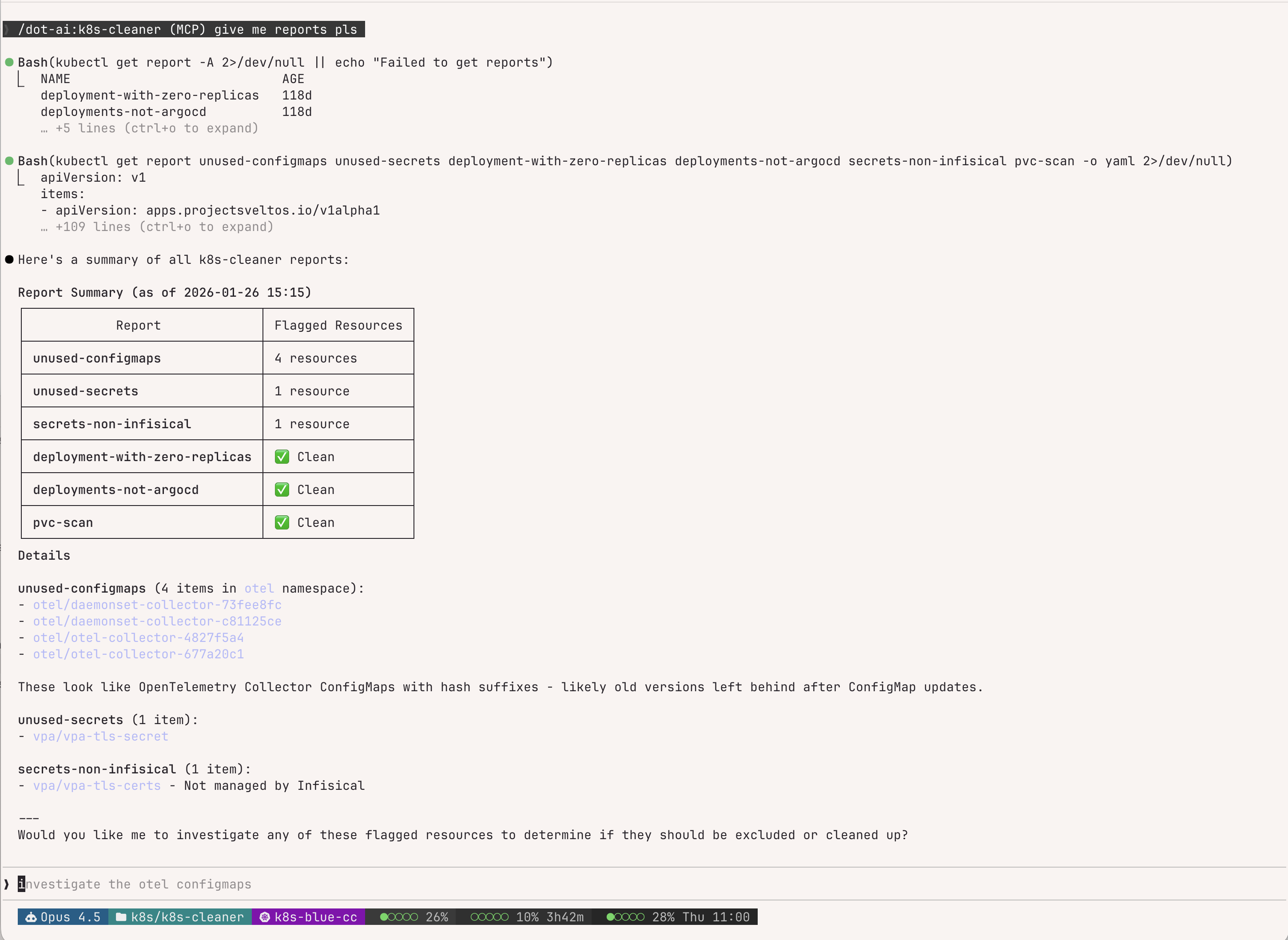
k8s-cleaner is a Kubernetes controller from the Projectsveltos ecosystem that identifies unused, orphaned, or unhealthy resources using custom Lua scripts.
Why I need a prompt for this: The Lua scripts and exclusion patterns are fiddly. The prompt teaches Claude my scan configurations, the report review workflow, and how to add exclusions without breaking existing rules. All scans run in read-only mode.
## Report Review Workflow

1. List all reports: `kubectl get report -A`
2. Check report details: `kubectl describe report <name>`
3. Inspect flagged resources for patterns (labels, annotations)
4. Propose exclusion rules based on findings

## Global Ignore Annotation

metadata:
  annotations:
    k8s-cleaner.example.io/ignore: "true"

## Lua Exclusion Patterns

# By label
if configMap.metadata.labels["your-label"] == "value" then skip = true end

# By name pattern
if string.match(name, "^pattern%-") then skip = true end
Example session — Claude summarizing reports and offering to investigate:
crossplane-kcl
Crossplane is a Kubernetes-native control plane that lets you define cloud infrastructure (databases, buckets, clusters) as Kubernetes resources. KCL (Kusion Configuration Language) is a constraint-based configuration language — think “typed YAML with logic” — that Crossplane uses via function-kcl to write composition logic.
Why I need a prompt for this: Crossplane v2 introduced breaking changes (namespace-first, pipeline-only compositions, removed native P&T). KCL has Python-like syntax but with gotchas (no None, strict typing, different dict access). The prompt teaches Claude my specific compositions (wapp for apps, wdb for PostgreSQL, wsecret for Infisical), safe nested access patterns, how to use crossplane render for local testing, and v2-specific concepts like composition resource names. It also includes a “continuous improvement” trigger — when Claude discovers something new, it proactively asks if it should update the prompt.
## KCL Preamble

Every KCL composition step starts with:
oxr = option("params").oxr      # Observed composite resource
ocds = option("params").ocds    # Observed composed resources
dxr = option("params").dxr      # Desired composite resource

## Safe Nested Access (Critical!)

# BAD - will error if spec.secrets doesn't exist
secrets = oxr.spec.secrets.items  # Error!

# GOOD - safe access with fallback
secrets = oxr.spec.secrets if "secrets" in oxr.spec else {}

## Composition Resource Name (Required)

Every composed resource MUST have a unique identifier:
annotations = {
    "krm.kcl.dev/composition-resource-name" = "myapp-configmap"
}
vpa
Vertical Pod Autoscaler (VPA) automatically adjusts CPU and memory requests for pods based on actual usage. I configure it for memory-only autoscaling (CPU stays manual) with a 70th percentile target for tighter-than-default recommendations.
Why I need a prompt for this: VPA configuration currently lives in three different places (legacy centralized repo, app-local manifests, wapp specs) — I’m in the process of refactoring to app-local, and the prompt ensures Claude checks the right location before making changes. It covers the migration workflow (moving VPAs from the legacy centralized repo to app-local manifests), wapp Crossplane integration, s3bkp sidecar handling (Kyverno-injected containers must be mode: "Off"), detecting corrupt histogram data (when recommendations spike to exabytes), and CNPG memory sizing (PostgreSQL is excluded from VPA, using 7-day average analysis instead). The prompt also includes Prometheus MCP queries for checking memory alerts and scripts I’ve built for VPA maintenance.
## Where VPAs Live (3 Locations)

| Location | When to use |
|----------|-------------|
| App's `manifests/vpa.yaml` | Migrated apps (preferred) |
| Wapp `spec.vpa` section | Crossplane-deployed apps |
| `k8s/vpa/` repo | Legacy only - migrate first! |

## Migration: k8s/vpa → App Repo

1. Create `manifests/vpa.yaml` in app repo
2. Add VPA to app's Flux kustomization resources
3. Remove from k8s/vpa/helm/values.yaml
4. Push to Flux monorepo, reconcile

## s3bkp Sidecars (Always Add)

containerPolicies:
  - containerName: s3bkp-backup
    mode: "Off"
  - containerName: s3bkp-init
    mode: "Off"
CI/CD & Git
forgejo-actions
Forgejo is a self-hosted Git forge (a community fork of Gitea) with GitHub Actions-compatible CI/CD. I run my own instance and use KCL to template reusable workflow patterns via a custom kcl-ci library.
Why I need a prompt for this: The stack is deep — Forgejo Actions, Infisical secrets, Devbox environments, Task runners, KCL templating, Harbor registry, custom composite actions, and Renovate for version management. The prompt teaches Claude the “YAML first, KCL later” philosophy (don’t over-engineer), the kcl-ci library structure (steps → jobs → workflows), how to write custom workflows when no module exists, local path testing for template development, and all the gotchas around token authentication, secret paths, and push credentials.
## The Golden Rule: YAML First, KCL Later

**Always develop and test workflows in YAML first**, then migrate
to KCL templates only if the pattern is reusable across multiple repos.

## Standard Job Structure

steps:
  # 1. Checkout
  - uses: https://${{ secrets.READ_REPO_TOKEN }}@forgejo.example.com/xternal/checkout@v6
  # 2. Load secrets from Infisical
  - uses: .../xternal/secrets-action@v1
    with:
      secret-path: /FORGEJO/${{ github.repository }}
  # 3. Run task via devbox
  - run: devbox run -- task --yes your:task

## kcl-ci Library Structure

| Layer | Purpose | Examples |
|-------|---------|----------|
| `steps.*` | Atomic actions | checkout, infisical, artifact, build_push |
| `jobs.*` | Compose steps | security_scans, container_build, image_scans |
| `workflows.*` | Compose jobs | container_build, container_release, helm_build |
renovate
Renovate is a bot that automatically creates PRs to update dependencies. I run it self-hosted and use centralized config with custom regex patterns to detect versions in non-standard locations (Crossplane YAML, Flux HelmReleases, Harbor replications).
Why I need a prompt for this: Renovate’s regex managers are powerful but tricky — wrong patterns mean packages go undetected and unmaintained. The prompt teaches Claude my central config structure (default.json, wxs-groups.json, wxs-regex.json), the correct comment formats for different registries (Docker Hub vs ghcr.io vs Helm), the mandatory testing workflow (git staging required!), CLI tools for local testing, special registry auth quirks (codeberg.org, xpkg.crossplane.io), and Valkey cache clearing when debugging. It also emphasizes never inventing Renovate comments — always check existing patterns first.
## Harbor Replication Comment Formats

# Docker Hub:
# renovate: docker.io
image: "library/alpine"
tag: "3.22"

# Other registries (ghcr.io, quay.io):
# renovate: docker image=ghcr.io/org/image
image: "org/image"
tag: "v1.0.0"

# Helm charts:
# renovate: helm_repo=https://charts.example.io helm_chart=mychart
image: "charts.example.io/mychart"
tag: "1.2.3"

## Testing (MANDATORY before committing)

git add helm/files/crossplane/replications/PACKAGE.yaml  # REQUIRED!
renovate-local.sh --file=path/to/file.yaml               # Fast targeted test
renovate-versions | grep "PACKAGE_NAME"                  # Verify detection
forgejo-avatar
Forgejo is a self-hosted Git forge (community fork of Gitea). This prompt manages repository and organization avatars via the Forgejo API.
Why I need a prompt for this: I store logos in S3 (v3/logos/) so they’re reusable across repos — the prompt enforces checking S3 first before downloading from external URLs. It handles the full workflow: download image, base64 encode (without newlines!), POST to API, then backup to S3. Also covers copying avatars between orgs/repos, batch operations with parallel processing, and the zsh-specific backtick syntax my shell requires. Without this prompt, Claude forgets to check S3 or skips the backup step.
## Workflow (Always Follow)

1. Check S3: `mcli ls v3/logos/ | grep -i PROJECT_NAME`
2. If found → ask user: use existing or new URL?
3. Download/convert: `curl URL -o /tmp/avatar.png && base64 -i /tmp/avatar.png`
4. Upload to Forgejo:
   TOKEN=`env | grep FORGEJO_TOKEN | cut -d'=' -f2`
   IMAGE_BASE64=`cat /tmp/avatar_base64.txt | tr -d '\n'`
   curl -X POST "https://forgejo.example.com/api/v1/repos/OWNER/REPO/avatar" \
     -H "Authorization: token $TOKEN" -H "Content-Type: application/json" \
     -d "{\"image\": \"$IMAGE_BASE64\"}"
5. Upload to S3: `mcli cp /tmp/avatar.png v3/logos/NAME.png`
Infrastructure
wxs-app
This prompt orchestrates deploying applications to my Kubernetes homelab. It combines Crossplane compositions (Wapp for apps, Wdb for PostgreSQL via CloudNativePG, Wsecret for Infisical secrets) with optional upstream Helm charts, all deployed via Flux CD.
Why I need a prompt for this: The deployment workflow has many moving parts — checking Harbor for image replications, finding latest version tags (never latest!), choosing Helm+Crossplane vs Crossplane-only, creating Infisical folders before deployment, setting mode: standalone initially then removing it for DR, configuring DNS in both AdGuard and dnscontrol for public apps, setting up S3 backups, and creating the Flux Kustomization and HelmRelease in the monorepo. The prompt includes a complete checklist and asks the right questions at each phase.
## Decision Tree

Upstream Helm chart exists?
├─ YES → Helm + Crossplane (helm/ + manifests/Wsecret/Wdb)
└─ NO  → Crossplane-only (manifests/Wapp/Wsecret/Wdb)

## Critical Workflow Steps

1. Check Harbor replication: rg -i "image" ~/...k8s/harbor/.../replications/
2. Check image tags: skopeo list-tags docker://registry/image | sort -V | tail
3. Wdb mode: Use `mode: standalone` initially, REMOVE after deployment!
4. Create Infisical folders BEFORE deployment: /{APP}/APP and /{APP}/SU

## Wapp Quick Reference

spec:
  secrets:          # Embedded Wsecret
    items: [{name: x, secretsPath: "/K8S-CC/APP"}]
  database:         # Embedded Wdb (mode: standalone initially!)
    version: {postgresql: "18"}
    cluster: {instances: 3}
  ingress:          # Private by default
    host: app.example.com
    public: true    # For internet-facing
  vpa:              # Auto-enabled with maxAllowed
    maxAllowed: {memory: "1Gi"}
harbor-migration
Harbor is a container registry with replication, vulnerability scanning, and access control. I use it as my central registry, replicating images from Docker Hub, ghcr.io, quay.io, and Helm charts via ChartProxy. Replications are managed as Crossplane compositions.
Why I need a prompt for this: Harbor migrations involve many moving parts that are easy to mess up. The prompt teaches Claude the correct Renovate comment formats (different for Docker Hub vs ghcr.io vs Helm), how to check composition versions before creating YAML, verifying replications actually find packages, the harbor-api.py CLI for debugging, updating both container images AND Helm chart dependencies in applications, handling OCI registries that need auth, fixing corrupted blobs via GC, and the full removal process. Critical gotchas: always check Chart.yaml for Helm dependencies (not just container images), no trailing slashes in image paths, and test Renovate detection before committing.
## Renovate Comment Formats (Harbor Replications)

# Docker Hub:
# renovate: docker.io
image: "namespace/image"

# Other registries (ghcr.io, quay.io):
# renovate: docker image=ghcr.io/org/image
image: "org/image"

# Helm (chartproxy):
# renovate: helm_repo=https://charts.example.io helm_chart=mychart
image: "charts.example.io/mychart"

## Critical Verification Steps

1. Check composition version FIRST: kubectl get harborreplication | head -5
2. After apply, verify finds packages:
   harbor-api.py exec trigger POLICY --dry-run --no-wait
   harbor-api.py exec tasks EXECUTION_ID
3. Test Renovate: git add FILE && renovate-local.sh --file=FILE
Claude Code
reflect
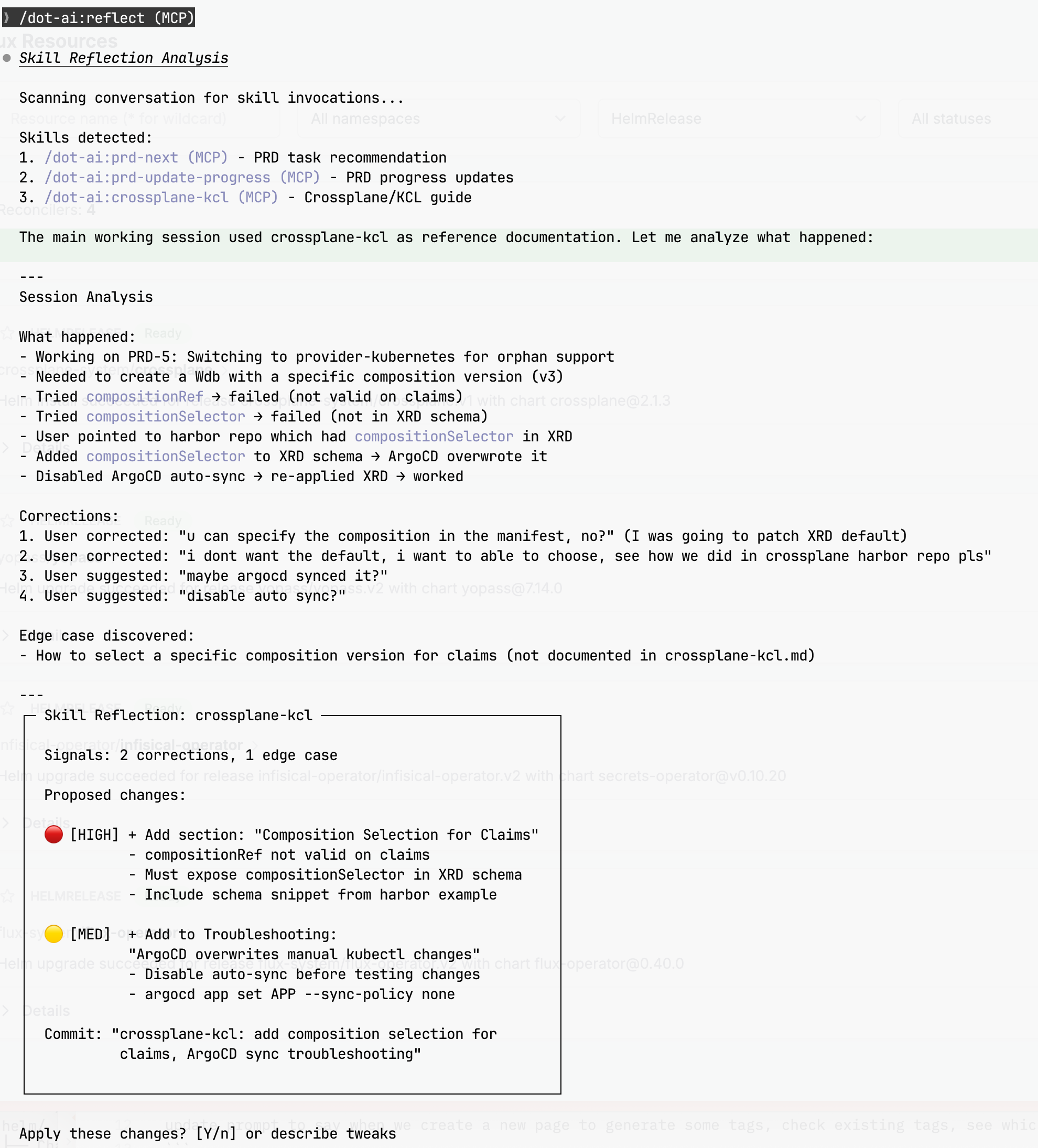
After a session using a skill, you often discover things that should be captured — corrections you made, edge cases that weren’t covered, preferences Claude didn’t know about. This prompt analyzes the conversation and proposes updates to the skill that was used.
Why I need a prompt for this: Without it, learnings evaporate when the context window clears. The prompt auto-detects which skill was invoked, scans for corrections and successes, proposes specific changes with confidence levels, and handles the git commit/push workflow. It also knows to do nothing when there’s nothing to improve.
## Trigger

Run `/reflect` or `/reflect [skill-name]` after a session where you used a skill.

## Signal Detection

Look for these patterns in the conversation:

| Signal Type | Confidence | Examples |
|-------------|------------|----------|
| Corrections | HIGH | "no", "not like that", "I meant..." |
| Successes | MEDIUM | "perfect", "great", accepted without changes |
| Edge Cases | MEDIUM | Questions skill didn't anticipate |
| Preferences | accumulate | Repeated patterns in user choices |

## Output Format

Presents a summary box with signals found and proposed changes:

- **Signals**: Count of corrections and successes detected
- **Proposed changes**: Listed by confidence (HIGH/MED/LOW)
- **Commit message**: Suggested git commit message

Ends with: `Apply these changes? [Y/n] or describe tweaks`
Example session — reflect analyzing a Crossplane/KCL session and proposing skill updates:
“Self-Improving Skills in Claude Code” — The original inspiration for this prompt.
Click to expand full prompt
# Reflect Skill

Analyze the current conversation and propose improvements to skills based on what worked, what didn't, and edge cases discovered.

## Trigger

Run `/reflect` or `/reflect [skill-name]` after a session where you used a skill.

## Workflow

### Step 1: Identify the Skill

**Auto-detection**: Scan the conversation for skill invocations by looking for:
- `<command-name>/dot-ai:skill-name (MCP)</command-name>` tags (skill invoked via MCP)
- `<command-name>/skill-name</command-name>` tags (skill invoked locally)
- Skill file reads from `~/stuff/gitrepos/wxs/prompts/[skill-name].md`

If multiple skills were used, list them and ask which to analyze.

If no skills detected and skill name not provided, ask:

Which skill should I analyze this session for?
- [list skills from prompts repo]
- [other]

### Step 2: Analyze the Conversation

Look for these signals in the current conversation:

**Corrections** (HIGH confidence):
- User said "no", "not like that", "I meant..."
- User explicitly corrected output
- User asked for changes immediately after generation

**Successes** (MEDIUM confidence):
- User said "perfect", "great", "yes", "exactly"
- User accepted output without modification
- User built on top of the output

**Edge Cases** (MEDIUM confidence):
- Questions the skill didn't anticipate
- Scenarios requiring workarounds
- Features user asked for that weren't covered

**Preferences** (accumulate over sessions):
- Repeated patterns in user choices
- Style preferences shown implicitly
- Tool/framework preferences

### Step 3: Propose Changes

Present findings:

┌─ Skill Reflection: [skill-name] ──────────────────────────────┐
│                                                               │
│  Signals: X corrections, Y successes                          │
│                                                               │
│  Proposed changes:                                            │
│                                                               │
│  🔴 [HIGH] + Add constraint: "[specific constraint]"          │
│  🟡 [MED]  + Add preference: "[specific preference]"          │
│  🔵 [LOW]  ~ Note for review: "[observation]"                 │
│                                                               │
│  Commit: "[skill]: [summary of changes]"                      │
│                                                               │
└───────────────────────────────────────────────────────────────┘

Apply these changes? [Y/n] or describe tweaks

**Accessible Color Palette** (use ANSI codes in terminal output):

- HIGH: `\033[1;31m` (bold red #FF6B6B - 4.5:1 on dark)
- MED: `\033[1;33m` (bold yellow #FFE066 - 4.8:1 on dark)
- LOW: `\033[1;36m` (bold cyan #6BC5FF - 4.6:1 on dark)
- Reset: `\033[0m`

Avoid: pure red (#FF0000) on black, green on red (colorblind users)

- **Y** — Apply changes, commit, and push
- **n** — Skip this update
- Or describe any tweaks to the proposed changes

### Step 4: If Approved

1. Read the current skill file from `~/stuff/gitrepos/wxs/prompts/[skill-name].md`
2. Apply the changes using the Edit tool
3. Run git commands:
   cd ~/stuff/gitrepos/wxs/prompts
   git add [skill-name].md
   git commit -m "[skill]: [change summary]"
   git push origin main
4. Confirm: "Skill updated and pushed to Git"

### Step 5: If No Improvements Found

If the conversation analysis reveals no corrections, edge cases, or actionable signals:

> "No improvements identified for [skill-name]. The skill performed well in this session with no corrections needed."

Skip the proposal step and end the reflection.

### Step 6: If Declined

Acknowledge and end the reflection:

> "Understood. No changes made to [skill-name]."

## Git Integration

This skill has permission to:
- Read skill files from `~/stuff/gitrepos/wxs/prompts/`
- Edit skill files (with user approval)
- Run `git add`, `git commit`, `git push` in the prompts directory

## Example Session

User runs `/reflect frontend-design` after a UI session:

┌─ Skill Reflection: frontend-design ───────────────────────────┐
│                                                               │
│  Signals: 2 corrections, 3 successes                          │
│                                                               │
│  Proposed changes:                                            │
│                                                               │
│  🔴 [HIGH] + Constraints/NEVER:                               │
│            "Use gradients unless explicitly requested"        │
│                                                               │
│  🔴 [HIGH] + Color & Theme:                                   │
│            "Dark backgrounds: use #000, not #1a1a1a"          │
│                                                               │
│  🟡 [MED]  + Layout:                                          │
│            "Prefer CSS Grid for card layouts"                 │
│                                                               │
│  Commit: "frontend-design: no gradients, #000 dark"           │
│                                                               │
└───────────────────────────────────────────────────────────────┘

Apply these changes? [Y/n] or describe tweaks

## Important Notes

- Always show the exact changes before applying
- Never modify skills without explicit user approval
- Commit messages should be concise and descriptive
- Push only after successful commit
claude-permissions
Claude Code requires explicit permissions for shell commands — you grant them via settings.json or interactively. This prompt manages those permissions safely.
Why I need a prompt for this: When I say “permit kubectl get pods”, I want Claude to update settings.json — not actually run the command. The prompt enforces this “analyze, don’t execute” behavior. It also breaks complex piped commands into individual tool permissions, defaults to read-only (asking confirmation for writes like kubectl apply or git push), and knows my settings location (~/mackup/confs/claude/settings.json). Prevents the common mistake of Claude helpfully running the command you wanted to whitelist.
## Primary Rule: NEVER Run, Only Permit

When user asks to permit a command:
1. DO NOT run it - only update settings.json
2. Break chains into individual tools (kubectl | grep → separate entries)
3. Default to READ-ONLY unless user confirms writes

## Read-Only Defaults (require confirmation for writes)

| Tool | Allow | Require Confirmation |
|------|-------|---------------------|
| kubectl | get, describe | apply, delete, edit |
| git | status, log, diff | push, commit |
| tofu | plan | apply, destroy |
| docker | ps, images, logs | rm, run |
| aws | describe, list, get | create, update, delete |
| rm, sudo, chmod | - | ALWAYS |
The Long Game
Taking time to create custom, tailored prompts pays off enormously in the long run. Think of each prompt as memory for your AI agent — it continuously learns and evolves, but never forgets the important bits.
Every time you encode a workflow, a gotcha, or a decision into a prompt, you’re:
- Saving what you’ve learned so it survives context windows
- Eliminating repetitive explanations — no more “remember, we use KCL not raw YAML”
- Reducing errors from Claude forgetting your conventions mid-task
- Getting faster — each improvement makes the next session smoother
The prompts on this page represent hundreds of hours of accumulated learning. But they started as single sentences and grew organically. Start small, iterate often, and let your AI agent evolve alongside your infrastructure.