Why Crossplane: Building an Internal Developer Platform on Kubernetes
The Kubernetes Resource Model
Everything starts with KRM, the Kubernetes Resource Model. The idea is simple but powerful: describe your desired state as declarative YAML resources, let controllers reconcile reality to match. Kubernetes already does this for Pods, Services, and Deployments. KRM extends that pattern to everything - databases, secrets, cloud resources, entire applications.
This is also what makes KRM a natural fit for GitOps. Since everything is a declarative resource, tools like Flux or ArgoCD can sync your entire platform state from Git, with continuous reconciliation and drift detection built in.
Several projects build on KRM to enable custom abstractions:
- Crossplane - the most mature, with both infrastructure providers and composition functions
- Kro (Kube Resource Orchestrator) - lighter-weight resource grouping
- Kratix - promise-based platform API framework
- KubeVela - OAM (Open Application Model) based application delivery platform
Big advocates for KRM and platform engineering are Abby Bangser and Viktor Farcic, I highly recommend their talks. I had the pleasure of bumping into Abby at one of the past KubeCons and had a very nice chat about KRM, Kratix, and Crossplane.
What Is Crossplane
Crossplane has two distinct sides, and understanding both is key:
1. Providers: The Terraform Competitor
Crossplane providers let you manage external infrastructure through Kubernetes CRDs. Need an AWS S3 bucket? A Harbor project? A Proxmox VM? Install the provider, write a manifest, apply it. The provider controller reconciles it.
This is where Crossplane competes directly with Terraform/OpenTofu. The difference: your infrastructure state lives in the Kubernetes API server, not in a state file. Drift detection is continuous, not on terraform plan. And you get the full Kubernetes ecosystem (RBAC, GitOps, admission webhooks) for free.
In my homelab, I use these providers:
| Provider | Purpose |
|---|---|
provider-kubernetes | Manage K8s resources (Objects, RBAC) |
provider-harbor | Harbor projects, replications, robot accounts |
2. Compositions: The Platform Builder
This is where Crossplane really shines, and what makes it different from just “Terraform in Kubernetes.”
Compositions let you define custom APIs (CRDs) that abstract away complexity. A developer doesn’t need to know about Deployment specs, Ingress annotations, cert-manager TLS, or VPA tuning. They just create a Wapp resource:
apiVersion: wapp.example.com/v1alpha1
kind: Wapp
metadata:
  name: myapp
spec:
  deployment:
    image:
      repository: my-registry.example.com/myapp
      tag: v1.0.0
    containerPort: 8080
  service:
    type: ClusterIP
    port: 80
Behind the scenes, the composition creates multiple Kubernetes resources: Deployment, Service, Ingress, VPA, ConfigMaps, and more. The developer doesn’t see any of that.
But the abstraction layer alone isn’t the real differentiator. You could achieve something similar with Helm charts and a GitOps tool like Flux or ArgoCD. What makes Crossplane compositions fundamentally different is the function pipeline. Each composition runs through a chain of functions that can execute arbitrary logic during reconciliation: real-time calculations, conditional resource generation, dynamic defaults based on cluster state, validation that goes beyond schema checks. These aren’t templates being rendered once and applied; they’re functions running real code on every reconciliation cycle. That’s what opens the door to things you simply can’t do with templating.
Crossplane ships with ready-made composition functions for KCL, Go templating, Python, and CUE, so you can get started quickly. When you outgrow them, whether you need more control or hit scale limits (as I did with resource consumption at ~300 XRs), you can swap in custom functions built with the official Go or Python SDKs, tailored to your exact use case. The API your developers use stays the same; only the engine behind it changes.
Internal Developer Platforms
KRM is heavily used for building Internal Developer Platforms (IDPs), and this is my main focus. I view IDPs as comparable to custom-tailored cloud consoles, built specifically for your organization’s needs.
Tools like Crossplane, Backstage, and Kratix are essential for building IDPs. They provide the building blocks for creating abstractions: custom APIs, developer portals, and resource orchestration. Without them, you’d be writing everything from scratch.
Why IDPs Matter
The core value: developers self-service, platform engineers are not the bottleneck.
DevOps culture was about breaking down the wall between Dev and Ops. Platform Engineering is, in some ways, moving back to having two teams, but this time with an API between them. The IDP is that API. Developers consume it, platform engineers build and maintain it.
I like IDPs because they:
- Abstract unnecessary complexity - devs don’t need to learn Kubernetes internals to deploy an app
- Enable self-service - no tickets, no waiting for ops to provision a database
- Enforce standards - security, monitoring, backup policies are baked into the abstractions
- Reduce cognitive load - fewer decisions means faster delivery
Platform Engineering Principles
A few things I’ve learned (some the hard way):
- Treat it as a product - your developers are your users, their adoption is your metric
- Don’t enforce it - if people aren’t using the platform voluntarily, you’re building the wrong thing. Adoption is one of the measures of success
- Ship fast, get feedback - a simple abstraction that ships today beats a perfect one that ships in 6 months
- Start small and iterate - you will build it at least three times. The first time you learn, the second time you have some understanding, and the third time you really tune it with best practices
- Shift to Platform, not Shift Left (original concept by Richard Seroter) - instead of pushing operational concerns onto developers, absorb them into the platform
If you’re looking into IDPs and Backstage in particular, I highly recommend checking out Scott Rosenberg’s Backstage plugins. Great collection of plugins for Crossplane, Kubernetes, and platform engineering workflows.
My Compositions
I currently maintain four Crossplane compositions, each replacing functionality that used to live in a monolithic Helm chart (wxs-k8s-common). All compositions and their resources are managed via GitOps with Flux, so everything from the composition definitions to the individual resources lives in Git and is continuously reconciled. With Crossplane v2, XRs (Composite Resources) can be namespace-scoped directly, so claims are no longer needed.
Wapp - Application Deployment
The biggest composition. I use Wapp for applications that only ship with a container image and don’t provide their own Helm chart. A single Wapp resource creates:
- Deployment (with security contexts, probes, resource limits)
- Service (ClusterIP, NodePort, or LoadBalancer)
- Ingress (public/private with TLS via cert-manager)
- ConfigMaps (inline data, env injection, file mounts)
- Volumes (PVC, emptyDir, NFS, hostPath)
- VPA (Vertical Pod Autoscaler)
- ServiceMonitor (Prometheus scraping)
- Nested Wdb and Wsecret resources
Currently managing 22 applications.
apiVersion: wapp.example.com/v1alpha1
kind: Wapp
metadata:
  name: myapp
spec:
  deployment:
    image:
      repository: my-registry.example.com/myapp
      tag: v1.0.0
    containerPort: 8080
  service:
    type: ClusterIP
    port: 80
Wdb - PostgreSQL Database
Manages CloudNativePG clusters with all the operational concerns baked in:
- CNPG Cluster (PostgreSQL, PostGIS, or TimescaleDB)
- ScheduledBackup (S3 backups via Barman)
- PgBouncer poolers
- PodMonitor and PrometheusRule
- Credential sync to Infisical via Wsecret
- Hibernation support (scale to zero while preserving data)
- Cross-cluster disaster recovery
Currently managing 21 PostgreSQL clusters.
apiVersion: wdb.example.com/v1alpha1
kind: Wdb
metadata:
  name: myapp-db
spec:
  type: postgresql
  version: "18"
  instances: 1
  storage: 8Gi
  initdb:
    database: myapp
    owner: myapp
Wsecret - Secret Management
Manages Kubernetes secrets via Infisical:
- InfisicalSecret (pull mode: Infisical to Kubernetes)
- InfisicalPushSecret (push mode: Kubernetes to Infisical, for bootstrapping)
- Multiple secrets per CR with global defaults and per-secret overrides
Currently managing 53 secret synchronizations.
apiVersion: wsecret.example.com/v1alpha1
kind: Wsecret
metadata:
  name: myapp-secrets
spec:
  secrets:
    - name: myapp-config
      secretsPath: "/K8S/MYAPP/CONFIG"
      secretName: myapp-config
Harbor Replications
Declaratively manages Harbor image replications:
- Project (conditional creation)
- Replication policy
- Retention policy
Currently managing 274 replication policies across 133 Harbor projects.
apiVersion: harbor.example.com/v1alpha1
kind: HarborReplication
metadata:
  name: alpine
spec:
  image: library/alpine
  tag: "3.*"
  registry: docker-hub
  project: my-project
  createProject: true
Composition Functions: From KCL to Go
All four compositions started with KCL (Kusion Configuration Language) via function-kcl. KCL is a great language for configuration, and it was the recommended approach for Crossplane compositions.
Then I hit a wall at ~300 Composite Resources: the single function-kcl pod was consuming 2.37 CPU cores and 479 MiB of memory. After migrating to custom Go functions, that dropped to 3 millicores and 15 MiB. An 800x CPU reduction.
The full story, with Grafana screenshots and trade-off analysis, is in From KCL to Custom Go Functions: An 800x CPU Reduction.
UIs for Crossplane
Managing Crossplane resources through kubectl works, but a visual UI makes it much easier to understand the resource graph and debug composition issues.
Komoplane (Archived)
I initially used Komoplane, a lightweight web UI for Crossplane. It showed the composition tree, resource status, and events in a clean interface.
Unfortunately, the project is now unmaintained and archived.
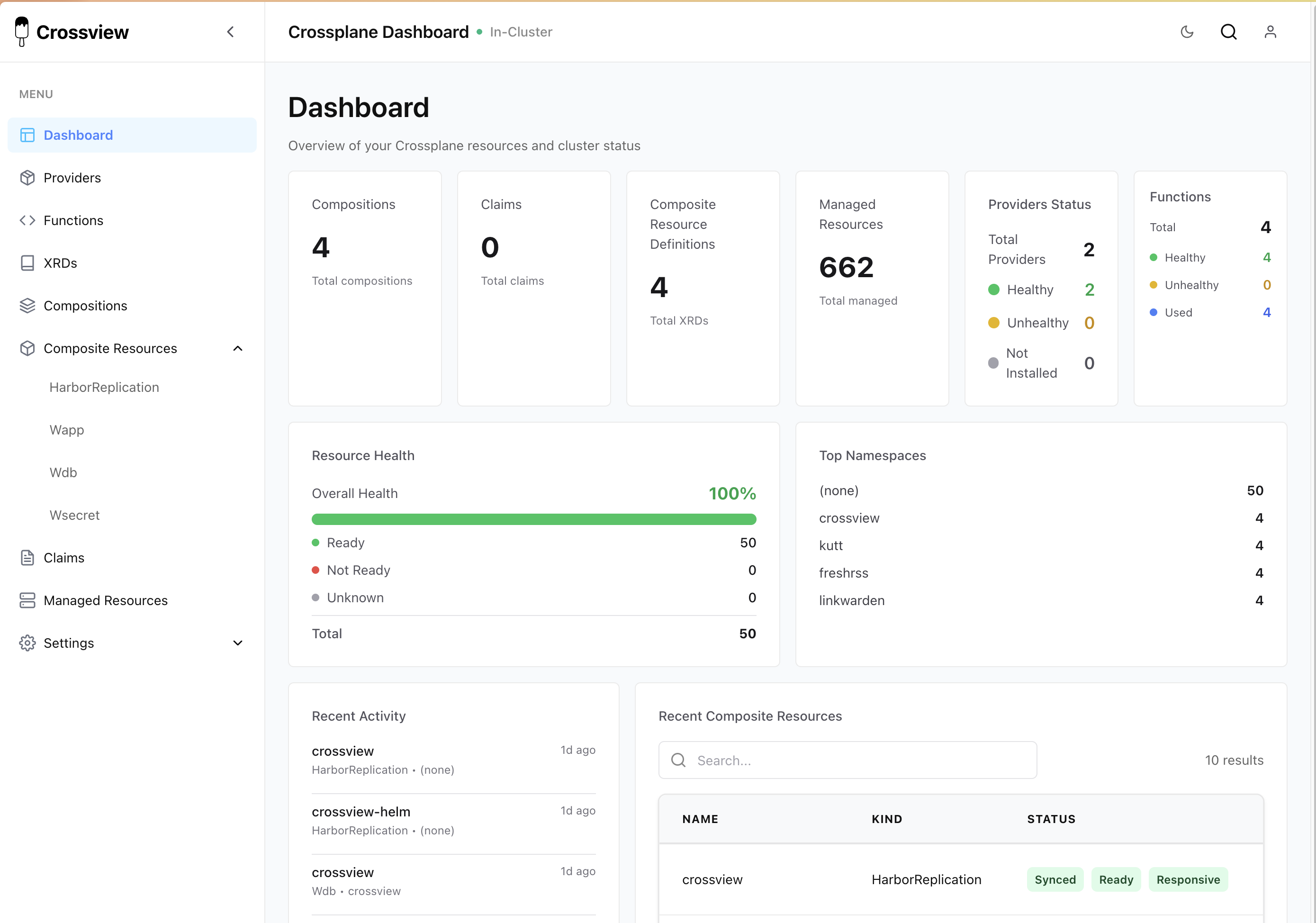
Crossview (Promising)
Crossview is a newer project that looks very promising as a Komoplane replacement. It provides a visual resource graph and composition explorer.
Testing Compositions
Compositions are code, and code needs tests. I use a three-tier testing strategy across all four compositions:
Go Unit Tests
Each composition function has standard Go unit tests that validate the function logic in isolation. No cluster needed, runs in seconds. These test individual resource generation, status field population, condition handling, and error cases.
Render Tests (Golden Files)
Render tests validate the full composition output without needing a cluster. Each test has an input YAML (a minimal XR) and an expected output YAML (the golden file). The Crossplane CLI renders the composition locally by running the function as a gRPC server, and the output is diff-compared against the golden file.
This catches regressions fast. If a function change alters the rendered Deployment spec, the golden file diff shows exactly what changed. When a change is intentional, a single command regenerates all golden files.
Chainsaw E2E Tests
Chainsaw (by Kyverno) runs end-to-end tests in ephemeral Kind clusters. Each test scenario creates real XRs and asserts that the composed resources actually reconcile to a ready state. These tests cover the full lifecycle: apply, reconcile, assert readiness, update, and cleanup.
For example, a Wapp test might create an application, wait for the Deployment to have ready replicas, update the image tag, and verify the rollout completes. A Wdb test might create a database cluster, verify backups are scheduled, then test hibernation and recovery.
CI Integration
All three tiers run in CI on every release. The pipeline bumps the VERSION file, builds the function image, then runs render tests and Chainsaw E2E tests in parallel. Both must pass before the release is published. Render tests take about 1-3 minutes, Chainsaw tests take 2-5 minutes.
| Layer | Speed | Cluster needed | What it catches |
|---|---|---|---|
| Go unit tests | seconds | no | Logic bugs in function code |
| Render tests | 1-3 min | no | Composition output regressions |
| Chainsaw E2E | 2-5 min | yes (Kind) | Integration issues, reconciliation failures |