AlertManager Slack Notifications That Don't Suck
fallback field used to be the answer; since Slack’s 2026 notification rebuild it is ignored, and push previews render the top-level message text instead. The fix is AlertManager’s message_text field (0.31+), pointed at the same compact template. Two traps along the way: the prometheus-operator silently drops empty-string config fields, and AlertManager posts completely blank Slack messages when a template fails to render.The Problem
I run kube-prometheus-stack with AlertManager sending alerts to a Slack channel. The in-app Slack experience is great: color-coded sidebars, severity badges, summary text, action buttons for runbooks, queries, and silencing.
But I don’t always have Slack open. When an alert fires and I get a push notification on my Apple Watch or macOS, this is what I used to see:
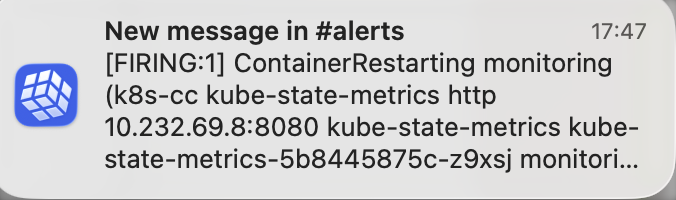
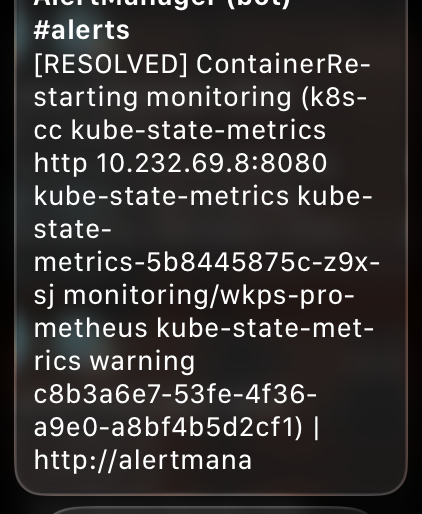
A wall of raw Prometheus labels, internal IPs, pod names, and truncated URLs:
[RESOLVED] ContainerRestarting monitoring (k8s-cc kube-state-metrics http
10.232.69.8:8080 kube-state-metrics kube-state-metrics-5b8445875c-z9xsj
monitori... kube-prometheus-stack-kube-prom-k8s-resources-workloads-namespace
https://alertmana...
No severity, no summary, no namespace context. On an Apple Watch screen, that’s completely useless for triage. I can’t tell if something critical is on fire or if it’s just an info-level alert I can ignore.
Why Push Notifications Look Bad
Slack discontinued its dedicated Apple Watch app back in 2018. What Apple Watch shows now are mirrored iOS push notifications. The same applies to macOS notification banners.
The push notification is built server-side by Slack from a plain-text view of the message. None of the rich attachment features survive: no color sidebar, no bold, no buttons. The only question is which plain-text field Slack picks, and the answer changed under me in 2026 (more on that below).
Here’s what renders where today:
| Feature | Slack App | Push Notification (Watch/iOS/macOS) |
|---|---|---|
top-level text (message_text) | Yes (plain line above attachment) | This is all you get |
attachment fallback | Hidden | No (ignored since the 2026 rebuild) |
attachment title | Yes | No |
attachment text (with markdown) | Yes | Only as a raw last resort, mrkdwn unrendered |
color sidebar | Yes | No |
| Action buttons | Yes | No |
| Bold, code blocks | Yes | No (stripped or shown raw) |
| Unicode emoji | Yes | Yes |
The Compact Template
Whatever field carries the push text, the content recipe is the same: front-load status, severity (as emoji), alert name, namespace, and summary, all in plain text. Target under 150 characters; the Apple Watch Long Look shows about 4-6 lines before scrolling.
{{ define "slack.fallback" -}}
    {{- if eq .Status "firing" -}}
        {{- if eq .CommonLabels.severity "critical" }}🔴 {{ else if eq .CommonLabels.severity "warning" }}🟡 {{ else }}🔵 {{ end -}}
    {{- else -}}✅ {{ end -}}
    {{- $n := len .Alerts -}}
    {{- if eq .Status "firing" }}{{ $n = len .Alerts.Firing }}{{ end -}}
    {{- if gt $n 1 }}×{{ $n }} {{ end -}}
    {{- .CommonLabels.alertname -}}
    {{- if .CommonLabels.namespace }} in {{ .CommonLabels.namespace }}{{ end -}}
    {{- if (index .Alerts 0).Annotations.summary }} - {{ (index .Alerts 0).Annotations.summary }}{{ end -}}
{{- end }}
Important details:
- Unicode emoji instead of Slack colon syntax (
:fire:) because the text renders outside the Slack app where colon syntax doesn’t work - Severity and status as one emoji: 🔴 critical, 🟡 warning, 🔵 info mean firing; ✅ means resolved. The FIRING/RESOLVED words would only repeat what the emoji already says, so they’re dropped to buy back preview space
- Alert count only when it matters:
×3appears only for grouped notifications with more than one alert; the common single-alert case doesn’t waste characters on:1 - Namespace included so I immediately know which service is affected
- Summary appended for context, but it gets truncated naturally if too long
When I first built this in March 2026, wiring the template into the attachment fallback field was the whole fix, and it worked: compact pushes on the watch, rich attachment in the app, two independent rendering paths.
Then Slack Moved the Cheese
A few months later, a push notification caught my eye for the wrong reason:
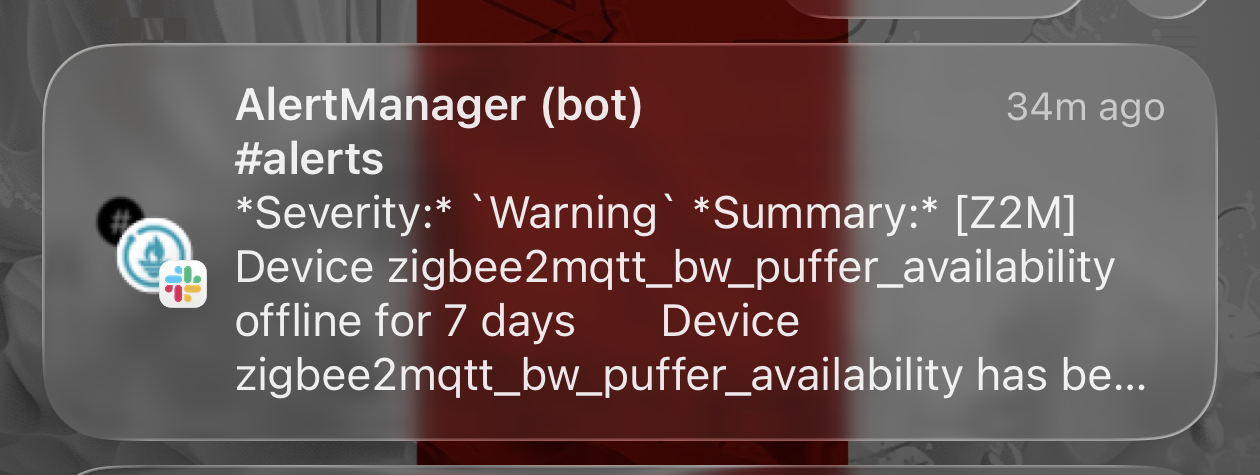
Literal asterisks and backticks: that’s the attachment text with its mrkdwn (Slack’s markdown flavor) unrendered, not my carefully crafted fallback. Nothing on my side had changed; I verified the whole chain (template ConfigMap mounted, live config referencing it, the notifier still sending the field). Slack simply stopped using fallback for push previews, around the time it rebuilt its notification system in early 2026.
What Slack’s push pipeline wants now is the top-level message text, the same field the chat.postMessage docs describe as the fallback string displayed in notifications when a message carries blocks. AlertManager grew a field for exactly this: message_text (added in 0.31), which is sent as the top-level text alongside the attachment.
The Fix, Current Edition
Point message_text at the same compact template. I kept fallback set too, for any client that still honors it:
slack_configs:
  - api_url_file: /etc/alertmanager/secrets/alertmanager-secrets/slack_api_url
    channel: "#alerts"
    # message_text is the top-level Slack 'text' field: since Slack's 2026
    # notification rebuild, push previews render it and ignore the legacy
    # attachment fallback. It also renders in-app as a plain line above
    # the attachment.
    message_text: '{{ template "slack.fallback" . }}'
    fallback: '{{ template "slack.fallback" . }}'
    color: '{{ template "slack.color" . }}'
    # Title must render empty via a template; a literal '' is dropped by
    # omitempty when the operator re-marshals the config, resurrecting
    # the default title.
    title: '{{ "" }}'
    text: '{{ template "slack.text" . }}'
One side effect is actually a feature: the top-level text renders in-app as a plain headline above the attachment, and becomes the channel-list preview. But it also made my old attachment redundant: the title repeated the alert name, the text repeated the severity and summary. So I slimmed the attachment down to the per-alert descriptions plus the action buttons, and let the headline do the talking:
{{/* The attachment text (in-app only). Status, severity, alertname, and
     summary live in message_text, the plain headline above the attachment,
     so the attachment carries only descriptions and the action buttons. */}}
{{ define "slack.text" -}}
    {{ range .Alerts }}
        {{- if .Annotations.description }}
        {{- "\n" -}}
        {{ .Annotations.description }}
        {{- "\n" -}}
        {{- end }}
    {{- end }}
{{- end }}
Trap 1: omitempty eats your empty title
My first attempt at suppressing the duplicate attachment title was the obvious title: ''. It silently did nothing. The prometheus-operator parses the AlertManager config and re-marshals it with Go’s omitempty semantics: an empty-string field is dropped from the generated config entirely, and AlertManager falls back to its built-in default title template. The workaround is a template expression that renders empty but survives marshaling as a non-empty config string: title: '{{ "" }}'.
Trap 2: a failed template means a blank Slack message, silently
While rolling this out I deleted a now-unused template define in the same commit that removed its last reference from the config. Those two objects (the template ConfigMap and the operator-generated config Secret) reload independently, so for a brief window the live config referenced a define that no longer existed. The result was surreal: Slack messages with no content at all.
The reason is an upstream bug in AlertManager’s Slack notifier (still present in 0.32): template rendering errors are accumulated but never checked before the HTTP POST. The internal tmplText helper short-circuits to an empty string for every field rendered after the first error, so one missing define turns the entire message (title, text, headline, everything) into empty strings, and AlertManager happily posts the husk to Slack. No error logged, no failed-notification metric, just a blank message in the channel and a content-free push on your wrist.
Lesson: when removing template defines, expect a reload race window, and keep the old define around for one release if the blank-message failure mode matters to you.
The Result
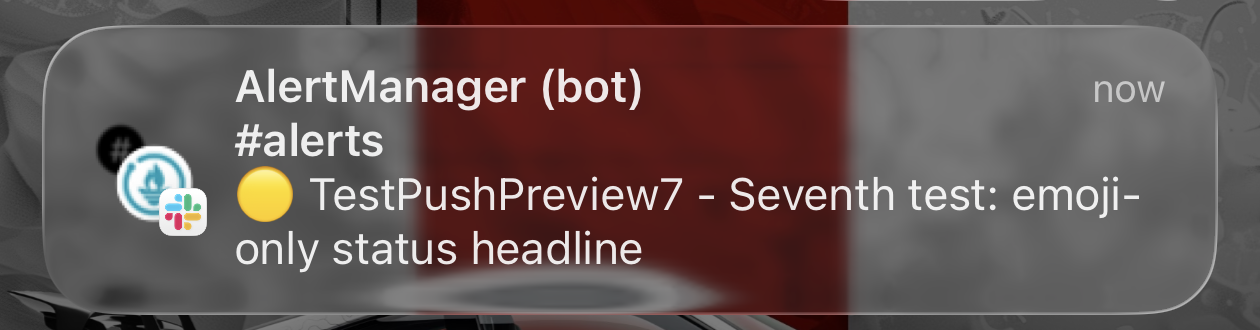
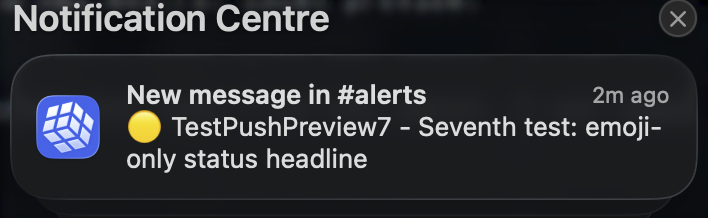
Push notifications are back to the compact format, now carried by message_text and even shorter without the FIRING word:
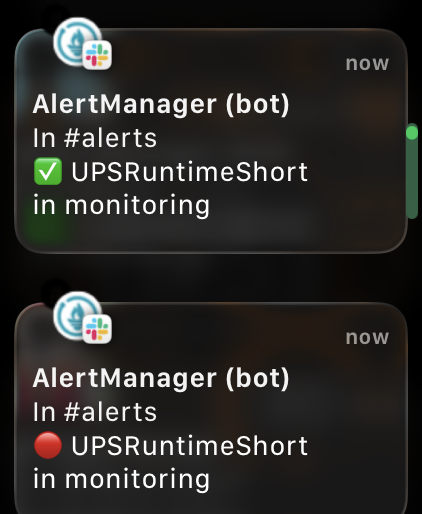
And where it all started, the Apple Watch, now showing real alerts that fit the screen: status emoji, alert name, namespace, at a glance:
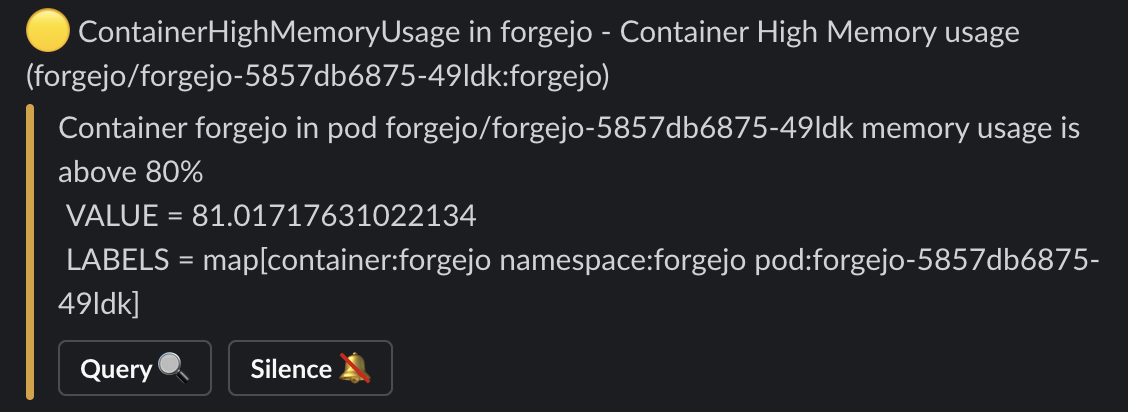
And the in-app message is leaner than the original version: plain headline, color sidebar, description, buttons, with no duplicated title or severity lines:
Key Takeaway
AlertManager’s Slack integration has two rendering paths, but which field feeds the push path is Slack’s call, and Slack changes its mind. The attachment fallback was the documented answer for years; the 2026 notification rebuild quietly switched push previews to the top-level message text. If your alert pushes suddenly turn into raw markdown soup, your config didn’t break: set message_text and move on.
And when an AlertManager Slack message comes out blank, don’t look at Slack: one of your templates failed to render, and the notifier shipped the empty husk without telling you.