Building This Blog: Hugo + Forgejo CI + GitHub Pages
When I decided to document my homelab adventures, my first instinct was Kubernetes—because of course it was. I have a tendency to overengineer things. But this time I brainstormed with Claude Code and found a simpler solution. Something low-maintenance: built on my infrastructure, hosted elsewhere. Just write markdown and publish.
  graph LR
    A[Forgejo Repo] -->|push to main| B[Forgejo CI]
    B -->|hugo build| C[gh-pages branch]
    C -->|mirror sync| D[GitHub]
    D -->|GitHub Pages| E[hai.wxs.ro]
Source stays private in Forgejo. Public site lives on GitHub Pages with free SSL.
Why Not Self-Host?
My homelab runs 90+ Flux-managed applications across a 3-node Proxmox cluster. Adding another service means more maintenance, more updates, more things that can break at 2 AM.
For a simple blog? Overkill.
The Stack
| Component | Choice | Why |
|---|---|---|
| Static generator | Hugo | Fast builds, Go templating |
| Theme | Hextra | Modern Tailwind-based, dark mode, search, diagrams |
| Source hosting | Forgejo | Self-hosted, private |
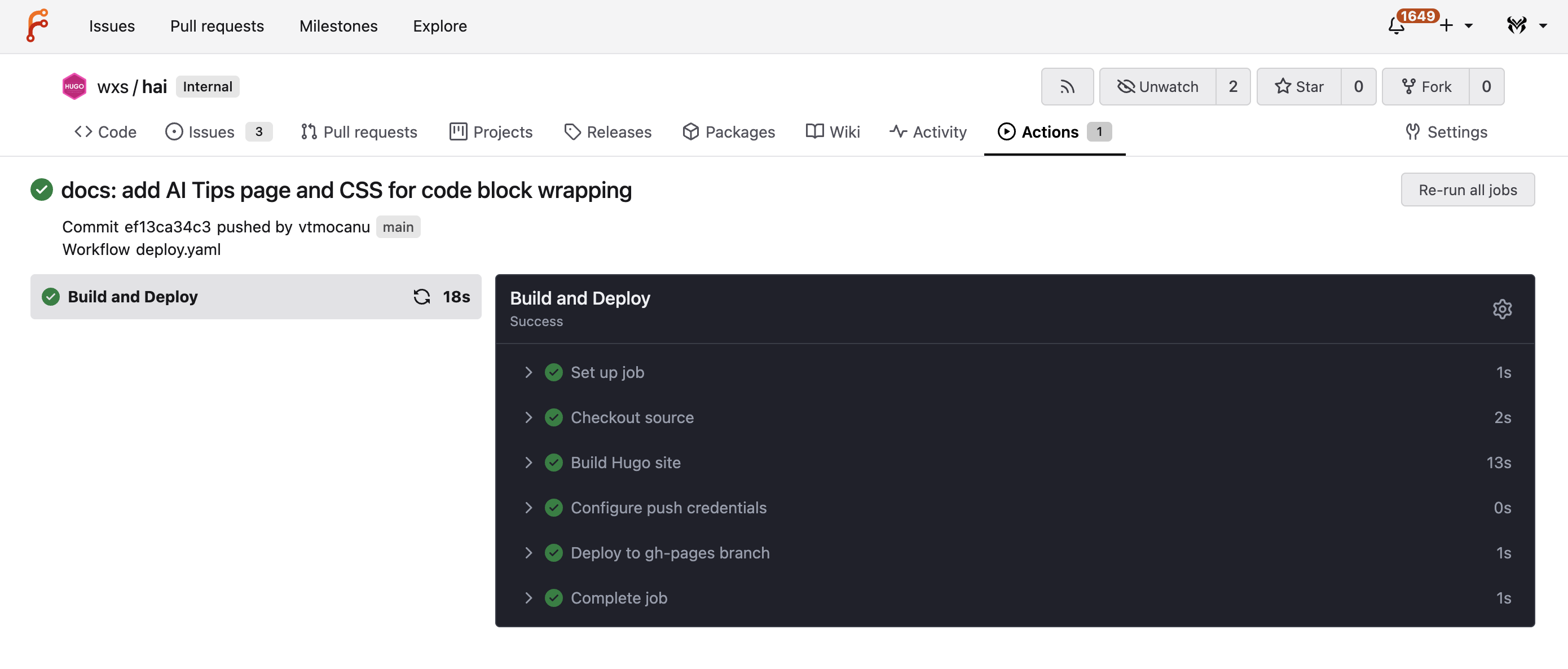
| CI/CD | Forgejo Actions | GitHub Actions compatible |
| Public hosting | GitHub Pages | Free, CDN-backed, zero maintenance |
| Comments | Giscus | GitHub Discussions-based, no separate account needed |
How It Works
- Push markdown to
mainbranch in Forgejo - Forgejo CI builds the site with Hugo
- Built files pushed to
gh-pagesbranch - Forgejo mirror syncs to GitHub automatically
- GitHub Pages serves the content
The entire pipeline runs in under a minute.
Key Decisions
Why not Cloudflare Pages? GitHub Pages is simpler for this use case - just push to a branch.
Why Forgejo mirror? I already use Forgejo mirrors for backup. The gh-pages branch syncs automatically alongside the main branch.
Why Hextra? Modern Tailwind-based theme with FlexSearch, Mermaid diagrams, and dark mode out of the box.
CI/CD Workflow
The Forgejo Actions workflow (.forgejo/workflows/deploy.yaml):
name: Deploy Hugo

on:
  push:
    branches: [main]
  workflow_dispatch:

jobs:
  build-deploy:
    runs-on: grunt
    steps:
      - uses: checkout@v6
        with:
          fetch-depth: '0'  # Needed for Git info (lastmod dates)

      - name: Build Hugo site
        run: devbox run -- hugo --minify

      - name: Deploy to gh-pages branch
        run: |
          # Clone gh-pages, replace content, force push
          git clone --branch gh-pages --depth 1 origin /tmp/gh-pages
          rm -rf /tmp/gh-pages/*
          cp -r public/* /tmp/gh-pages/
          cd /tmp/gh-pages && git add -A && git commit -m "deploy" && git push --force
Hugo Configuration
Theme switching via Hugo environments (config/_default/hugo.yaml):
baseURL: "https://hai.wxs.ro/"
title: "Homelab Adventures"

module:
  imports:
    - path: github.com/imfing/hextra

params:
  theme:
    default: system
    displayToggle: true
  search:
    enable: true
    type: flexsearch
Forgejo Mirror Setup
The mirror syncs both main and gh-pages branches to GitHub:
- Forgejo repo settings → Mirror → Add push mirror
- Target:
https://github.com/username/repo.git - Auth: GitHub personal access token
- Sync interval: On push
Directory Structure
hai/
├── content/           # Markdown content
│   ├── _index.md      # Homepage
│   ├── about/
│   ├── tutorials/
│   └── ...
├── config/
│   ├── _default/      # Production (Hextra)
│   ├── hextra/
│   └── lotus/         # Alternative theme
├── .forgejo/
│   └── workflows/
│       └── deploy.yaml
└── devbox.json        # Hugo + Go versions
Comments with Giscus
Giscus uses GitHub Discussions for comments—readers authenticate with GitHub, and you get notifications on new comments.
params:
  comments:
    enable: true
    type: giscus
    giscus:
      repo: your-username/your-repo
      repoId: R_kgDO...
      category: General
      categoryId: DIC_kwDO...
Setup: Enable Discussions on your GitHub repo, install the Giscus app, grab config values from giscus.app.
Local Development
Using Devbox for reproducible environments—both locally and in CI. The Forgejo runners use the same devbox.json to install Hugo and Go, so what works on my machine works in the pipeline (devbox.json):
{
  "packages": {
    "hugo": "0.154.5",
    "go": "1.25.5"
  }
}
# Start dev server with drafts
devbox run -- hugo server -D
# Build production
devbox run -- hugo --minifyAnalytics with Umami
Using Umami Cloud (free tier) for privacy-friendly analytics — lightweight, GDPR-compliant, no cookies.
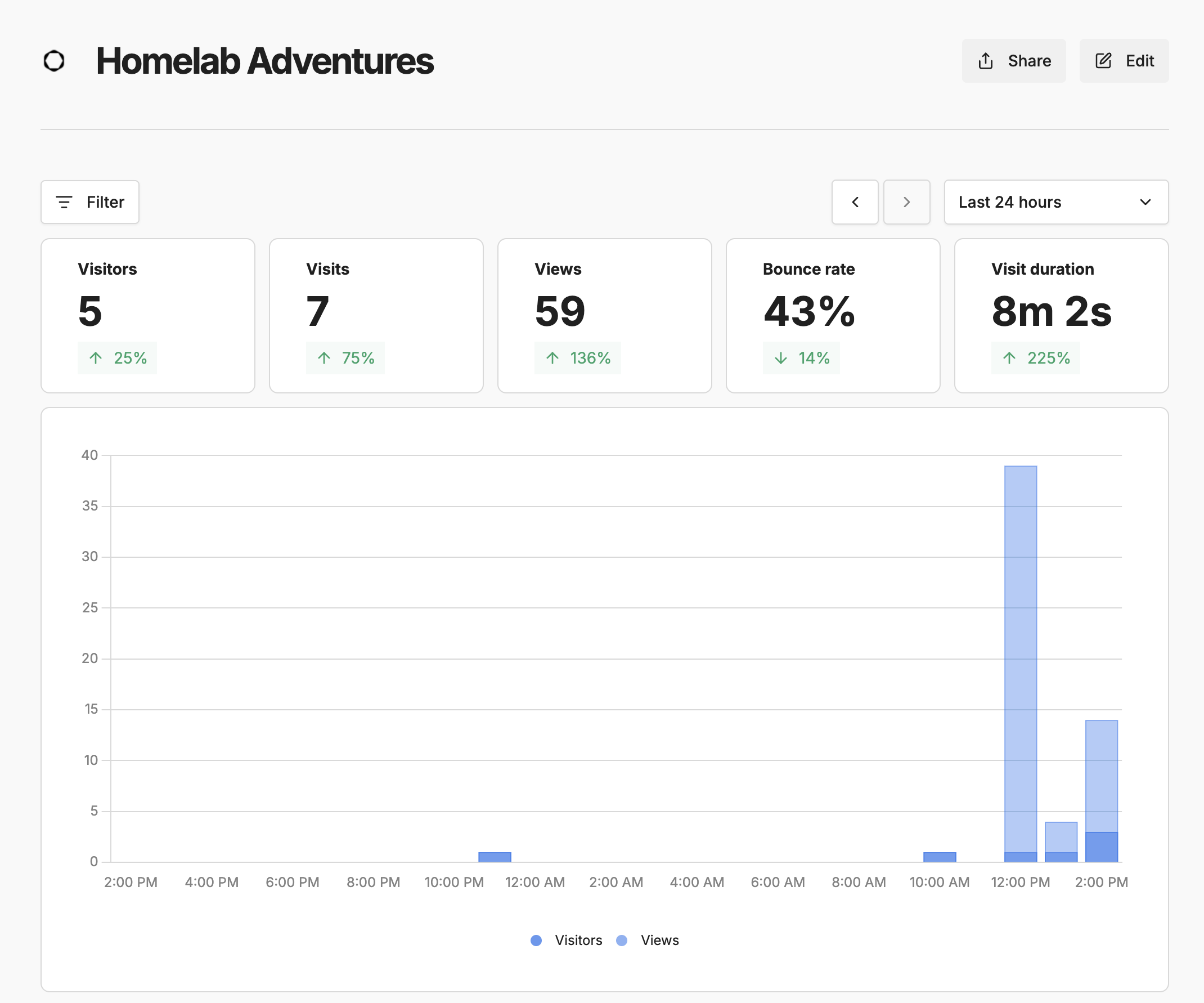
Hextra has native config support. Add to hugo.yaml:
params:
  analytics:
    umami:
      serverURL: https://cloud.umami.is
      websiteID: your-website-id
      scriptName: script.js  # Umami Cloud uses script.js, not umami.js
What’s Next
This blog will document the homelab journey - infrastructure patterns, automation workflows, and lessons learned from running self-hosted services at home.